
 Join our Discord

🎒 LRRP Manbag Inventory
QBCore • ESX • Qbox • Premium Bag Items • Manual Bag Switching • Custom Inventory Styling
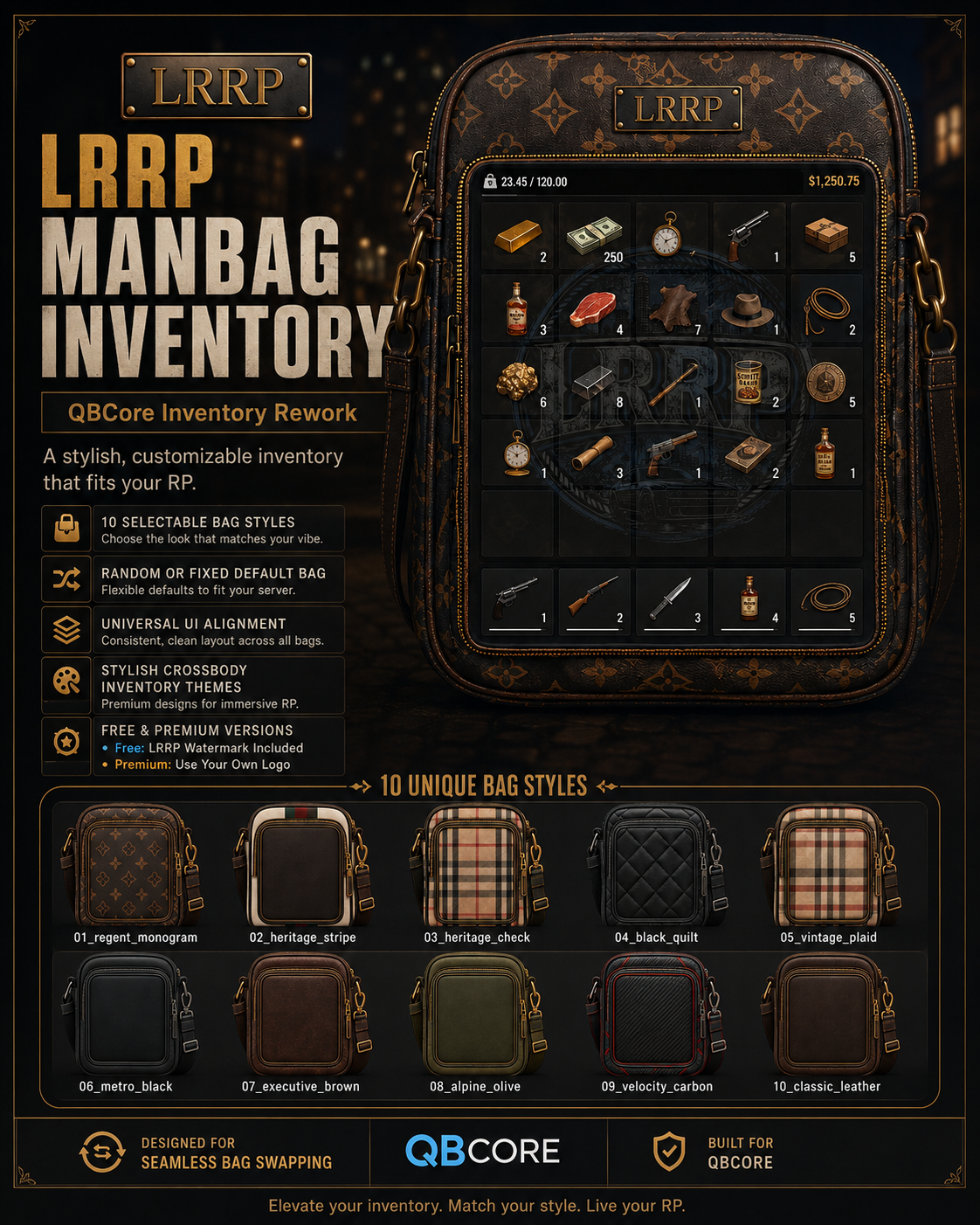
LRRP Manbag Inventory transforms the standard FiveM inventory into a detailed crossbody/manbag-inspired interface.
Instead of opening a generic inventory panel, the player's items are displayed over a physical bag-style interface designed to give the inventory its own identity while retaining the functionality players expect from their inventory system.
Built with support for:
- ✅ QBCore
- ✅ ESX
- ✅ Qbox
- ✅
qb-inventory - ✅
ox_inventory
Available in FREE and PREMIUM editions.
🆓 FREE Edition
The FREE edition gives servers the complete LRRP Manbag experience using one included bag design.
FREE includes:
- ✅ 1 bag design
- ✅ LRRP branded interface
- ✅ Permanent LRRP logo
- ✅ QBCore support
- ✅ ESX support
- ✅ Qbox support
- ✅
qb-inventoryintegration - ✅
ox_inventoryintegration - ✅ Responsive bag interface
- ✅ Clean inventory slot alignment
- ✅ Secondary inventory compatibility
- ✅ Stashes
- ✅ Shops
- ✅ Trunks / vehicle storage
- ✅ Gloveboxes
- ✅ Drops
- ✅ Drag & drop
- ✅ Item quantities
- ✅ Weight display
- ✅ Existing inventory functionality retained
- ❌ Multiple bag designs
- ❌ Bag switching
- ❌ Custom server branding
There is no automatic or random bag switching.
💎 PREMIUM Edition
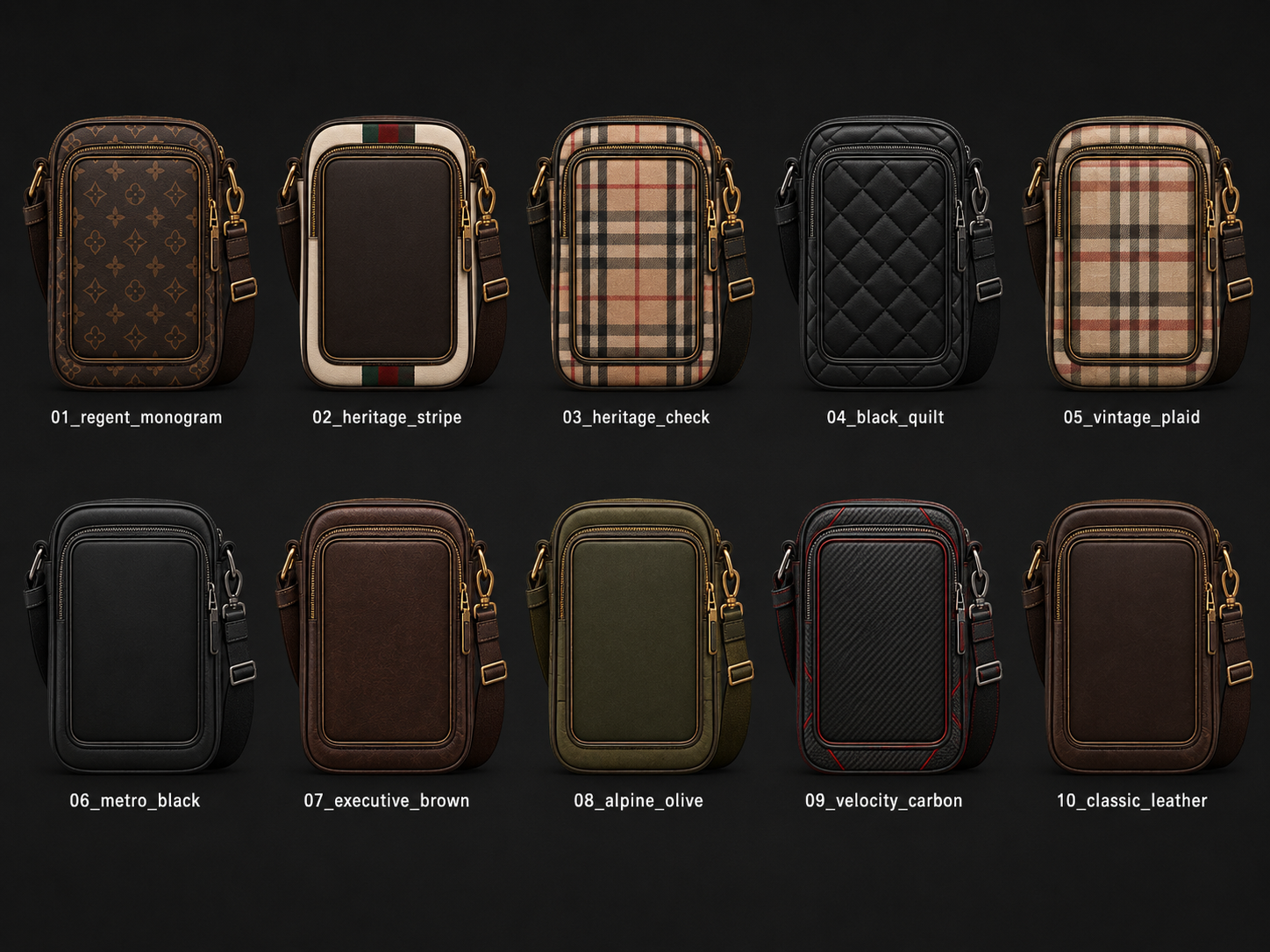
Premium unlocks the complete collection of 10 bag designs and allows players to easily switch between them.
🎒 10 Included Bag Styles
01_regent_monogram
02_heritage_stripe
03_heritage_check
04_black_quilt
05_vintage_plaid
06_metro_black
07_executive_brown
08_alpine_olive
09_velocity_carbon
10_classic_leather
Every design uses the same inventory positioning and slot alignment, allowing players to switch bags without changing how their inventory works.
🔄 Manual Bag Switching
Premium includes an easy-to-use bag selector allowing the player to choose which bag they want to use.
Once selected, their chosen bag is remembered.
No automatic toggling.
Bags do not randomly change when:
- Opening the inventory
- Closing the inventory
- Logging in
- Changing jobs
- Changing clothing
- Restarting the resource
A player's bag only changes when they deliberately select another bag.
🎁 Usable Bag Items
Premium also includes usable inventory items for the different bag designs.
Each bag can be linked to its own item.
For example:
Bag Item → Use Item → Inventory switches to that bag
The bag item is not consumed when used.
This allows server owners to use bags as actual obtainable items through systems such as:
- 🛒 Shops
- 🎁 Rewards
- 💼 Jobs
- 🏆 Events
- 🎰 Prizes
- 💰 Purchases
- 🔐 Unlockables
The required item definitions are included with the package.
Where SQL registration is required, the necessary duplicate-safe SQL is also supplied.
🔐 Optional Bag Ownership
Premium can optionally require players to actually possess a bag item before they can select that design.
Server owners can therefore choose between:
🔓 All Bags Available
Players can freely switch between all 10 Premium designs.
🔒 Item-Based Bags
Players must own the corresponding bag item before that design can be used.
This can be configured by the server owner.
🎨 Premium Branding
Premium removes the permanent FREE edition LRRP branding.
Premium is unbranded by default and includes support for server owners to configure their own custom logo.
This makes it easy to integrate the inventory into the visual identity of an individual server.
👜 Redesigned Player Inventory
The player inventory is built around the bag artwork while secondary inventories remain clean and easy to use.
Depending on the installed inventory system, existing functionality such as the following is retained:
- 📦 Item slots
- 🖱️ Drag & drop
- 🔢 Item quantities
- 🛡️ Durability
- ⚖️ Weight
- 🎒 Stashes
- 🛒 Shops
- 🚗 Trunks
- 🚘 Gloveboxes
- 📍 Drops
- 📦 Secondary containers
The bag system focuses on changing the visual player inventory experience without unnecessarily changing the underlying economy or inventory behaviour.
🎨 Clean Layered Interface
Inventory slots use a low-opacity design so the bag artwork remains visible behind the player's items.
The result is a layered interface:
Bag Artwork → Inventory Slots → Items
rather than placing an opaque inventory panel over the bag.
🆚 FREE vs PREMIUM
🆓 FREE
- 🎒 1 bag
- 🔵 LRRP branding
- ✅ QBCore
- ✅ ESX
- ✅ Qbox
- ✅ qb-inventory / ox_inventory support
- ❌ Bag selector
- ❌ Bag items
- ❌ Custom branding
💎 PREMIUM
- 🎒 All 10 bags
- 🔄 Manual bag switching
- 💾 Selected bag persistence
- 🎁 Usable bag items
- 🔒 Optional item ownership requirements
- 🖼️ Individual bag item icons
- 🎨 Custom logo support
- ✅ QBCore
- ✅ ESX
- ✅ Qbox
- ✅ qb-inventory / ox_inventory support
- ❌ No random bag switching
- ❌ No automatic bag toggling
📦 Requirements
General
- FiveM Server
- One supported framework
- One supported inventory configuration
QBCore
-
qb-core -
qb-inventory
ESX
-
es_extended -
ox_inventory
Qbox
-
qbx_core -
ox_inventory
The correct item definitions and installation files are supplied inside the appropriate package.
SQL is included where required.
Full installation and usage instructions are included inside both the FREE and PREMIUM downloads.
📁 Installation
The package contains separate instructions for the supported configurations.
For QBCore using qb-inventory, the supplied inventory build is installed using the included instructions.
For ESX and Qbox using ox_inventory, the included LRRP integration is applied to the server's existing ox_inventory installation.
⚠️ Always follow the included installation instructions for your framework and inventory combination.
🎒 Give your inventory its own identity.
One branded design in FREE.
10 switchable designs in PREMIUM.
QBCore • ESX • Qbox.